Huawei P30 Lite - Bootloader Unlock with tweezers and installing Root
My partner has this old Phone laying around and its software makes it unusable/untrustworthy for us. A few weeks ago I saw it is now possible AND documented how to mod it. Well... that is exactly what I did. I want to build a small emulation device out of it. To do that it involves A LOT of sketchy software incl. Windows 10 and a lot of trial and error. I would HIGHLY recommend to setup a spare PC with a spare SSD with everything disconnected from important stuff. I do not trust any of the software and want to be able to wipe everything when I'm done.
This is NOT a guide! I just documented for myself how I did it! It is supposed to help me and others to replicate it or have a point of reference well documented in one place. Please try flowing the used guides instead! Only use this for reference!
Some Explanations:
If I write "tweezer-fastboot" I mean the trick the following:
- I open Android Utility, select Huawei -> Service -> Then select the Kirin 710.
- I short the Test-Point to ground and plug the USB-A in. Then I press "Load Factory Fastboot".
- When it prompts me, I disconnected the USB-A, short the Test-Point to Ground again and then look at the screen until it starts flashing "hi63xx DDR [4]" and connect the battery again.
- After it finishes with an "invalid command" error I check the screen if it displays the fastboot screen. If not I execute "fastboot oem unlock" and then select no to make the screen turn on.
How to short the Test-Point (Test-Point is on the PCB (Right), shorted with a tweezer to the grounded shielding of the SOC (Left)):
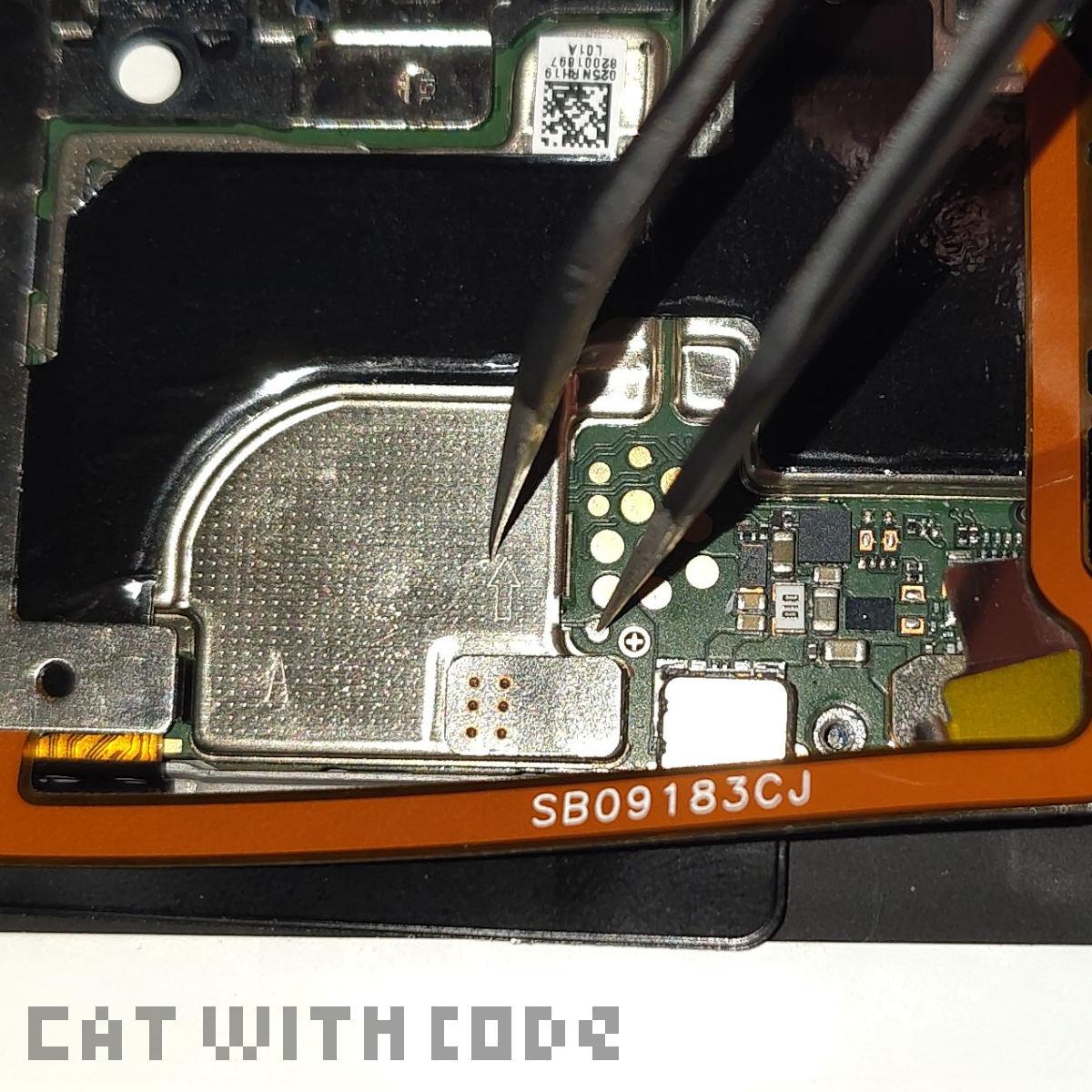
Almost all of this is based on a few guides online from GitHub and XDA. I linked everything I used. NOTHING is from me and all is from the guides! I only link to pages, not files!
I always said no to "Read-only System" prompt on the TWRP start screen!
The process:
-
My starting point on the phone:
- Model: MAR-LX1A
- Build: 12.0.0.251(C431E3RP2P2)
- EMUI-Version: 12.0.0
- CPU: Hisilicon Kirin 710
- 4GB/128GB RAM/ROM
-
I got everything software wise from the guides.
- Minimal ADB and Fastboot
- Microsoft Visual C++ Redistributable (Latest supported v14 (for Visual Studio 2017-2026))
- Android Utility patched (From the XDA guide)
- HiSuite Proxy V3.3.0
- Testpoint drivers (From the XDA guide)
- TWRP (SHRP-Reborn 3.1)
- Huawei Partition Kit
- HISuite 11.0.0.610_OVE (From the HISuite-Proxy GitHub Wiki)
- (Android) Platform Tools
- I installed Windows 10, Updated, installed all drivers, installed all software needed for modding and rebooted.
- NOTE: The Test-Point-Driver I needed to install AND when connected in Test-Point-Mode then point Windows to in the device manager to actually be installed.
- I opened the HiSuite Proxy and pressed setup.
- I opened the phone and disconnected the battery and finger print sensor.
- "tweezer-fastboot"
- Then I switched to reader in Android Utility and selected read.
-
I needed to downloaded the following files for my model (Downgrade Archive):
- 442707 - MAR-L21A-C431 - MAR-LGRP2-OVS-9.1.0.399 - hw-eea
- 322136 - MAR-L21A - CUST 9.0.1.6(C431) - hw-eea
- 321529 - MAR-L21A-PRELOAD 9.0.1.3(C431R2) - hw-eea
- Then I opened flasher and selected "Load firmware package" and loaded the extracted "update_full_base folder".
- Then I pressed "cust" and selected the "cust" from the extracted "cust archive". Then I selected the "cust update" file from the same folder for "Cust Update".
- Then I pressed preload and selected the preload from the extracted preload archive". Then I selected the preload update" file from the same folder for preload Update".
- Then I pressed "Firmware update (FB)".
- One VERY LONG reboot later it worked! I got 9.1.0.399 on the phone now!
- I enabled Developer settings and disabled and re-enabled OEM unlocking (needed WiFi) and USB-Debugging, else it did not work.
- I turned the phone off, and reentered "tweezer-fastboot".
- Then I executed "fastboot oem unlock" in a CMD. It will ask you if you want to "Lock" the Bootloader? Just say yes and it unlocks it, it only displays wrong because the Bootloader is temporarily unlocked right now LOL.
- I downloaded the needed GSI. I would recommend a bvS version of a GSI. I was not able to get Magisk or TWRP with Root running. The system was either extremely unstable or did not boot or crash instantly on the home screen. I used Andy GSI's on non important phones in the past and it also works well here: "lineage-20.0-20251021-UNOFFICIAL-arm64_bvS.img".
- I restarted it as soon as I saw the Huawei Setup screen, did A OTHER "tweezer-fastboot" and flashed the GSI: "fastboot flash system lineage-20.0-20251021-UNOFFICIAL-arm64_bvS.img".
- BTW.: When you do a "tweezer-fastboot" it sticks to some extend until you unplug the phone. The phone then will turn off immediately and reboot. E.G. it allows you to access fastboot until you unplug the phone, but it protects some partitions anyway.
- On the boot-unlock-waring I pressed Vol+ for 3 seconds and did a factory reset of the data.
- Annnndddd... It boots!
- I then needed to do a other "tweezer-fastboot" so we can write into recovery.
- Then I flashed the recovery image from the guide "fastboot flash erecovery_ramdisk recovery.img"
- One reboot and holding Vol+ for 3 seconds again to get into the TWRP-Fork.
- I copied contents from kit-folder to the platform-tools folder as instructed on XDA.
- In a CMD I ran 1-GetData.cmd.
- Reboot to Android.
- I enabled default file transfer in Developer settings via USB-debugging and Root adb too.
- I executed "2-InstallProg.cmd"
- Then I opened the app, pressed "Read Phone GPT" and "GPT Refactor" and I got all information it wants on the screen (and a success popup in French for some reason).
- I executed "3-GetIMG.cmd" and got my 10 files the readme told me I need.
- I Rebooted and pressed Vol+ for 3 seconds once again to get back into the TWRP-Fork.
- I tried browsing the files in DATA and it worked.
- I executed "4-ProcessData.cmd". This took forever.
- It rebooted, did some stuff in fastboot (I'm pretty sure you need to be in this strange post "tweezer-fastboot" stage get this to work) and then asked me to reboot to TWRP. I did so.
- I executed "5-FlashIMG.cmd". This also took FOR EVER! After a reboot the Data partition was only 20GB, as expected.
- And after a other reboot to recovery I checked my DATA and VENDOR partitions by file browsing. It worked, so I formatted Data (with some root errors) in the TWRP folk. Now I had back my 100+GB DATA partition again.
- Now would have come the Magisk part on a "bvN"-GSI BUT I was not able to patch the recovery for root. It always ended in a Bootloop for me. For me only bvS with stock erecovery_ramdisk and recovery_ramdisk worked for some kind of ROOT. The partition resizing seems to be always needed to make everything work well, especially if you want G-Apps or similar stuff, but I don't think it has something to do with Root. It also dose not help that the TWRP-Fork recovery has issues with DATA-Formating, Rooted Recovery and sometimes even booting. I read multiple times that it is recommended after everthing to install the stock (rooted if it works) erecovery_ramdisk and recovery_ramdisk. Sucks that you will have to do A OTHER "tweezer-fastboot" to exchange stuff there. I'm sure it is nice having a Recovery that can not break and can self heal the OS but holy sh*t sucked this modding process. This just made me feel confirmed again in my opinions about many manufacturers again.
- After booting everything was very strange and buggy. I got through the setup and skipped everything. Then I rebooted and everything was back to normal. IDK. what that was about.
- And finally as usual on GSI's for me LOL, Enable: "Settings/Phh Treble Settings/Misc features/Use alternate way to detect headsets" to get AUX-Headphones working.
- Also change the following: Settings -> PHH Treble Settings -> Misc features -> "Mediatek GED KPI support" and "Disable SF GL backpressure".
That it! A lot of sh*t for something that can take less then 5 minutes on phones from manufactures that don't hate their customers to death. After all that I installed my emulators and configured them, put the phone in a nice controller for it and was finished with my emulation hand held idea. Was it worth saving this turd… no. Did I have fun… only a little. Dose it finally work now, yes.
Sources: